
Yes Formatting the HardDisk to remove the virus is an ultimate solution but I advise it only when its very severe. If your computer is infected with a virus formatting or erasing the hard disk drive and starting over will almost always remove any type of virus.
However, keep in mind if backups have been made that contain the virus, other media or drives connected to the computer have a virus, your computer is connected to another computer on a network with a virus, and/or the virus is stored on some other type of software you use with your computer it can become re-infected if not properly protected.
Best way to get safe from Virus is using a good anti virus software and keeping it updated on regular intervals. also I personally recommend use of PC Guard (One type of Pc Reovery Hardware that can be put in PCI Slot on your machine) will make your system safe not only from virus but also from System Crashes.
you can contact me on info@premierinfo.org for more details about PC Guard.
Showing posts with label Computer Tips n Fundaes. Show all posts
Showing posts with label Computer Tips n Fundaes. Show all posts
Tuesday, September 8, 2009

Wednesday, June 17, 2009
How to remove Shortcut Arrow from Desktop Icons
Hey friend this is a very interesting tip....
Have you ever noticed carefully shortcut icons in desktop ? Have you seen errow in the corner of each icon. In this article will give you tip that will let you remove it completely.
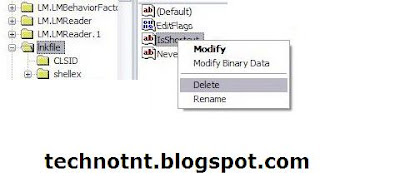
Right click on IsShortcut and choose Delete. Click Yes button.
Log off and then Log on Windows XP again
Now the shortcut arrows are disappeared.
Have you ever noticed carefully shortcut icons in desktop ? Have you seen errow in the corner of each icon. In this article will give you tip that will let you remove it completely.
- Open the Registry Editor program by running regedit, (click Start > Run and type regedit then press Enter. )
- Find the key path "HKEY_CLASSES_ROOT\lnkfile"
- Click on the lnkfile folder, you will see IsShortcut key in the right page like the picture below.

How to change the Location of IE Favorites
If you format your computer, your Favorite web page list will be deleted from your computer either, because you do not know where is the location of IE Favorites and forget to back up it. Someone may know where it is and back up it before formatting their hardisk. However, it is better to move your web page list into the safe area than to keep it in the default area because it may be deleted together with formatting your hardisk. This tip will teach you to change the location of the IE Favorites to another drive of the same hardisk. Follow these steps.
Create a new folder in drive D: which is separated from the Windows drive. In this tutorial I name the folder to be “Favorites“.
Click Start > Run and type regedit then press Enter.
In the Registry Editor window, Go to the path like below,
HKEY_CURRENT_USER\Software\Microsoft\Windows\CurrentVersion\Explorer\Shell Folders
In the right hand panel of the Registry Editor window, Find the string name Favorites and double click on it.
Change the location of IE Favorites to the new location which is the new folder you created it in the first step like D:\Favorites then click OK.
Go to the path,
HKEY_CURRENT_USER\Software\Microsoft\Windows\CurrentVersion\Explorer\User Shell Folders
Again find the Favorites string and double click on it.
Change the location to D:\Favorites and then click OK.
Create a new folder in drive D: which is separated from the Windows drive. In this tutorial I name the folder to be “Favorites“.
Click Start > Run and type regedit then press Enter.
In the Registry Editor window, Go to the path like below,
HKEY_CURRENT_USER\Software\Microsoft\Windows\CurrentVersion\Explorer\Shell Folders
In the right hand panel of the Registry Editor window, Find the string name Favorites and double click on it.
Change the location of IE Favorites to the new location which is the new folder you created it in the first step like D:\Favorites then click OK.
Go to the path,
HKEY_CURRENT_USER\Software\Microsoft\Windows\CurrentVersion\Explorer\User Shell Folders
Again find the Favorites string and double click on it.
Change the location to D:\Favorites and then click OK.
How to Convert FAT32 to NTFS
There is an easy way to change your hardisk file system from FAT32 to NTFS "without formatting".
- Open Run box, go to Start > Run
- Type Convert X: /FS:NTFS , X is a computer’s drive you would like to convert.
- You are brought to a screen which you must follow the steps, then Windows restart itself. Finish!
- Open Run box, go to Start > Run
- Type Convert X: /FS:NTFS , X is a computer’s drive you would like to convert.
- You are brought to a screen which you must follow the steps, then Windows restart itself. Finish!
Saturday, April 4, 2009
Surprise your friends with these hidden characters.
You won't find these in the emoticon menu, but you can send them by typing the keyboard shortcuts directly into your message.
Link From Yahoo
Available Yahoo! Messenger Emoticons (1) Emoticon Key Combination Description
puppy dog eyes :o3 puppy dog eyes
I don't know :-?? I don't know
not listening %-( not listening
pig :@) pig
cow 3:-O cow
monkey :(|) monkey
chicken ~:> chicken
rose @};- rose
good luck %%- good luck
flag **== flag
pumpkin (~~) pumpkin
coffee ~O) coffee
idea *-:) idea
Available Yahoo! Messenger Emoticons (2) Emoticon Key Combination Description
skull 8-X skull
bug =:) bug
alien >-) alien
frustrated :-L frustrated
praying [-O< praying
money eyes $-) money eyes
whistling :-" whistling
feeling beat up b-( feeling beat up
peace sign :)>- peace sign
shame on you [-X shame on you
dancing \:D/ dancing
Available Yahoo! Messenger Emoticons (3) Emoticon Key Combination Description
bring it on >:/ bring it on
hee hee ;)) hee hee
chatterbox :-@ chatterbox
not worthy ^:)^ not worthy
oh go on :-j oh go on
star (*) star
hiro o-> hiro
billy o=> billy
april o-+ april
yin yang (%) yin yang
bee :bz bee
transformer* [..] transformer*
* Only available in Yahoo! Messenger for the Web.
You won't find these in the emoticon menu, but you can send them by typing the keyboard shortcuts directly into your message.
Link From Yahoo
Available Yahoo! Messenger Emoticons (1) Emoticon Key Combination Description
puppy dog eyes :o3 puppy dog eyes
I don't know :-?? I don't know
not listening %-( not listening
pig :@) pig
cow 3:-O cow
monkey :(|) monkey
chicken ~:> chicken
rose @};- rose
good luck %%- good luck
flag **== flag
pumpkin (~~) pumpkin
coffee ~O) coffee
idea *-:) idea
Available Yahoo! Messenger Emoticons (2) Emoticon Key Combination Description
skull 8-X skull
bug =:) bug
alien >-) alien
frustrated :-L frustrated
praying [-O< praying
money eyes $-) money eyes
whistling :-" whistling
feeling beat up b-( feeling beat up
peace sign :)>- peace sign
shame on you [-X shame on you
dancing \:D/ dancing
Available Yahoo! Messenger Emoticons (3) Emoticon Key Combination Description
bring it on >:/ bring it on
hee hee ;)) hee hee
chatterbox :-@ chatterbox
not worthy ^:)^ not worthy
oh go on :-j oh go on
star (*) star
hiro o-> hiro
billy o=> billy
april o-+ april
yin yang (%) yin yang
bee :bz bee
transformer* [..] transformer*
* Only available in Yahoo! Messenger for the Web.
Thursday, September 27, 2007
Useful Websites :: You would love them
WEBSITE LINKS
House Plans www.apnaeghar.cp
Xmas Gift www.gifttohome.com
Graphic Modeling Vacant www.eliteillusion.2k.com
Fasion Model www.elitemodels.com
Contest World www.contestjunction.com www.freelotto.com
Contest India www.contest2win.com
Free Phone Call www.net2phone.com www.dialpad.com www.mediaring.com
All Education In Earth www.idrc.ca
Greeting Cards # Music www.123greetings.com
Astrology www.astro-vision.com
All County # Language www.ifru.com
All Job www.zipahead.com.
Old Computers www.obsoletecomputermuseum.com.
Old Phones www.oldphones.com
Free e-mail www.email.com www.sify.com www.yahoo.com
Indian Laws www.lawsinindia.com.
Free[ S.W] Download www.download.com
Symbols Encyclopedia www.symbols.com
Free Phone Call www.net2phone.com
Free Net Connection www.caltiger.com
Play & Smile www.elol.com
Womens History www.teleport.com www.megaines.com
Mahathma Gandhi www.mahatma.org.in
Chess Play & Learn www.gm.chess.com
Stamp Collection www.salamindia.com
Free Phone Call www.net2phone.com
House Plans www.apnaeghar.cp
Xmas Gift www.gifttohome.com
Graphic Modeling Vacant www.eliteillusion.2k.com
Fasion Model www.elitemodels.com
Contest World www.contestjunction.com www.freelotto.com
Contest India www.contest2win.com
Free Phone Call www.net2phone.com www.dialpad.com www.mediaring.com
All Education In Earth www.idrc.ca
Greeting Cards # Music www.123greetings.com
Astrology www.astro-vision.com
All County # Language www.ifru.com
All Job www.zipahead.com.
Old Computers www.obsoletecomputermuseum.com.
Old Phones www.oldphones.com
Free e-mail www.email.com www.sify.com www.yahoo.com
Indian Laws www.lawsinindia.com.
Free[ S.W] Download www.download.com
Symbols Encyclopedia www.symbols.com
Free Phone Call www.net2phone.com
Free Net Connection www.caltiger.com
Play & Smile www.elol.com
Womens History www.teleport.com www.megaines.com
Mahathma Gandhi www.mahatma.org.in
Chess Play & Learn www.gm.chess.com
Stamp Collection www.salamindia.com
Free Phone Call www.net2phone.com
Friday, September 14, 2007
Computer Acronyms
ADSL - Asymmetric Digital Subscriber Line
AGP - Accelerated Graphics Port
ALI - Acer Labs, Incorporated
ALU - Arithmetic Logic Unit
AMD - Advanced Micro Devices
APC - American Power Conversion
ASCII - American Standard Code for Information Interchange
ASIC - Application Specific Integrated Circuit
ASPI - Advanced SCSI Programming Interface
AT - Advanced Technology
ATI - ATI Technologies Inc.
ATX - Advanced Technology Extended
--- B ---
BFG - BFG Technologies
BIOS - Basic Input Output System
BNC - Barrel Nut Connector
--- C ---
CAS - Column Address Signal
CD - Compact Disk
CDR - Compact Disk Recorder
CDRW - Compact Disk Re-Writer
CD-ROM - Compact Disk - Read Only Memory
CFM - Cubic Feet per Minute (ft�/min)
CMOS - Complementary Metal Oxide Semiconductor
CPU - Central Processing Unit
CTX - CTX Technology Corporation (Commited to Excellence)
--- D ---
DDR - Double Data Rate
DDR-SDRAM - Double Data Rate - Synchronous Dynamic Random Access Memory
DFI - DFI Inc. (Design for Innovation)
DIMM - Dual Inline Memory Module
DRAM - Dynamic Random Access Memory
DPI - Dots Per Inch
DSL - See ASDL
DVD - Digital Versatile Disc
DVD-RAM - Digital Versatile Disk - Random Access Memory
--- E ---
ECC - Error Correction Code
ECS - Elitegroup Computer Systems
EDO - Extended Data Out
EEPROM - Electrically Erasable Programmable Read-Only Memory
EPROM - Erasable Programmable Read-Only Memory
EVGA - EVGA Corporation
--- F ---
FC-PGA - Flip Chip Pin Grid Array
FDC - Floppy Disk Controller
FDD - Floppy Disk Drive
FPS - Frame Per Second
FPU - Floating Point Unit
FSAA - Full Screen Anti-Aliasing
FS - For Sale
FSB - Front Side Bus
--- G ---
GB - Gigabytes
GBps - Gigabytes per second or Gigabits per second
GDI - Graphical Device Interface
GHz - GigaHertz
--- H ---
HDD - Hard Disk Drive
HIS - Hightech Information System Limited
HP - Hewlett-Packard Development Company
HSF - Heatsink-Fan
--- I ---
IBM - International Business Machines Corporation
IC - Integrated Circuit
IDE - Integrated Drive Electronics
IFS- Item for Sale
IRQ - Interrupt Request
ISA - Industry Standard Architecture
ISO - International Standards Organization
--- J ---
JBL - JBL (Jame B. Lansing) Speakers
JVC - JVC Company of America
- K ---
Kbps - Kilobits Per Second
KBps - KiloBytes per second
--- L ---
LG - LG Electronics
LAN - Local Are Network
LCD - Liquid Crystal Display
LDT - Lightning Data Transport
LED - Light Emitting Diode
--- M ---
MAC - Media Access Control
MB � MotherBoard or Megabyte
MBps - Megabytes Per Second
Mbps - Megabits Per Second or Megabits Per Second
MHz - MegaHertz
MIPS - Million Instructions Per Second
MMX - Multi-Media Extensions
MSI - Micro Star International
--- N ---
NAS - Network Attached Storage
NAT - Network Address Translation
NEC - NEC Corporation
NIC - Network Interface Card
--- O ---
OC - Overclock (Over Clock)
OCZ - OCZ Technology
OEM - Original Equipment Manufacturer
--- P ---
PC - Personal Computer
PCB - Printed Circuit Board
PCI - Peripheral Component Interconnect
PDA - Personal Digital Assistant
PCMCIA - Peripheral Component Microchannel Interconnect Architecture
PGA - Professional Graphics Array
PLD - Programmable Logic Device
PM - Private Message / Private Messaging
PnP - Plug 'n Play
PNY - PNY Technology
POST - Power On Self Test
PPPoA - Point-to-Point Protocol over ATM
PPPoE - Point-to-Point Protocol over Ethernet
PQI - PQI Corporation
PSU - Power Supply Unit
--- R ---
RAID - Redundant Array of Inexpensive Disks
RAM - Random Access Memory
RAMDAC - Random Access Memory Digital Analog Convertor
RDRAM - Rambus Dynamic Random Access Memory
ROM - Read Only Memory
RPM - Revolutions Per Minute
--- S ---
SASID - Self-scanned Amorphous Silicon Integrated Display
SCA - SCSI Configured Automatically
SCSI - Small Computer System Interface
SDRAM - Synchronous Dynamic Random Access Memory
SECC - Single Edge Contact Connector
SODIMM - Small Outline Dual Inline Memory Module
SPARC - Scalable Processor ArChitecture
SOHO - Small Office Home Office
SRAM - Static Random Access Memory
SSE - Streaming SIMD Extensions
SVGA - Super Video Graphics Array
S/PDIF - Sony/Philips Digital Interface
--- T ---
TB - Terabytes
TBps - Terabytes per second
Tbps - Terabits per second
TDK - TDK Electronics
TEC - Thermoelectric Cooler
TPC - TipidPC
TWAIN - Technology Without An Important Name
--- U ---
UART - Universal Asynchronous Receiver/Transmitter
USB - Universal Serial Bus
UTP - Unshieled Twisted Pair
--- V ---
VCD - Video CD
VPN - Virtual Private Network
--- W ---
WAN - Wide Area Network
WTB - Want to Buy
WYSIWYG - What You See Is What You Get
--- X ---
XGA - Extended Graphics Array
XFX - XFX Graphics, a Division of Pine
XMS - Extended Memory Specification
XT - Extended Technology
AGP - Accelerated Graphics Port
ALI - Acer Labs, Incorporated
ALU - Arithmetic Logic Unit
AMD - Advanced Micro Devices
APC - American Power Conversion
ASCII - American Standard Code for Information Interchange
ASIC - Application Specific Integrated Circuit
ASPI - Advanced SCSI Programming Interface
AT - Advanced Technology
ATI - ATI Technologies Inc.
ATX - Advanced Technology Extended
--- B ---
BFG - BFG Technologies
BIOS - Basic Input Output System
BNC - Barrel Nut Connector
--- C ---
CAS - Column Address Signal
CD - Compact Disk
CDR - Compact Disk Recorder
CDRW - Compact Disk Re-Writer
CD-ROM - Compact Disk - Read Only Memory
CFM - Cubic Feet per Minute (ft�/min)
CMOS - Complementary Metal Oxide Semiconductor
CPU - Central Processing Unit
CTX - CTX Technology Corporation (Commited to Excellence)
--- D ---
DDR - Double Data Rate
DDR-SDRAM - Double Data Rate - Synchronous Dynamic Random Access Memory
DFI - DFI Inc. (Design for Innovation)
DIMM - Dual Inline Memory Module
DRAM - Dynamic Random Access Memory
DPI - Dots Per Inch
DSL - See ASDL
DVD - Digital Versatile Disc
DVD-RAM - Digital Versatile Disk - Random Access Memory
--- E ---
ECC - Error Correction Code
ECS - Elitegroup Computer Systems
EDO - Extended Data Out
EEPROM - Electrically Erasable Programmable Read-Only Memory
EPROM - Erasable Programmable Read-Only Memory
EVGA - EVGA Corporation
--- F ---
FC-PGA - Flip Chip Pin Grid Array
FDC - Floppy Disk Controller
FDD - Floppy Disk Drive
FPS - Frame Per Second
FPU - Floating Point Unit
FSAA - Full Screen Anti-Aliasing
FS - For Sale
FSB - Front Side Bus
--- G ---
GB - Gigabytes
GBps - Gigabytes per second or Gigabits per second
GDI - Graphical Device Interface
GHz - GigaHertz
--- H ---
HDD - Hard Disk Drive
HIS - Hightech Information System Limited
HP - Hewlett-Packard Development Company
HSF - Heatsink-Fan
--- I ---
IBM - International Business Machines Corporation
IC - Integrated Circuit
IDE - Integrated Drive Electronics
IFS- Item for Sale
IRQ - Interrupt Request
ISA - Industry Standard Architecture
ISO - International Standards Organization
--- J ---
JBL - JBL (Jame B. Lansing) Speakers
JVC - JVC Company of America
- K ---
Kbps - Kilobits Per Second
KBps - KiloBytes per second
--- L ---
LG - LG Electronics
LAN - Local Are Network
LCD - Liquid Crystal Display
LDT - Lightning Data Transport
LED - Light Emitting Diode
--- M ---
MAC - Media Access Control
MB � MotherBoard or Megabyte
MBps - Megabytes Per Second
Mbps - Megabits Per Second or Megabits Per Second
MHz - MegaHertz
MIPS - Million Instructions Per Second
MMX - Multi-Media Extensions
MSI - Micro Star International
--- N ---
NAS - Network Attached Storage
NAT - Network Address Translation
NEC - NEC Corporation
NIC - Network Interface Card
--- O ---
OC - Overclock (Over Clock)
OCZ - OCZ Technology
OEM - Original Equipment Manufacturer
--- P ---
PC - Personal Computer
PCB - Printed Circuit Board
PCI - Peripheral Component Interconnect
PDA - Personal Digital Assistant
PCMCIA - Peripheral Component Microchannel Interconnect Architecture
PGA - Professional Graphics Array
PLD - Programmable Logic Device
PM - Private Message / Private Messaging
PnP - Plug 'n Play
PNY - PNY Technology
POST - Power On Self Test
PPPoA - Point-to-Point Protocol over ATM
PPPoE - Point-to-Point Protocol over Ethernet
PQI - PQI Corporation
PSU - Power Supply Unit
--- R ---
RAID - Redundant Array of Inexpensive Disks
RAM - Random Access Memory
RAMDAC - Random Access Memory Digital Analog Convertor
RDRAM - Rambus Dynamic Random Access Memory
ROM - Read Only Memory
RPM - Revolutions Per Minute
--- S ---
SASID - Self-scanned Amorphous Silicon Integrated Display
SCA - SCSI Configured Automatically
SCSI - Small Computer System Interface
SDRAM - Synchronous Dynamic Random Access Memory
SECC - Single Edge Contact Connector
SODIMM - Small Outline Dual Inline Memory Module
SPARC - Scalable Processor ArChitecture
SOHO - Small Office Home Office
SRAM - Static Random Access Memory
SSE - Streaming SIMD Extensions
SVGA - Super Video Graphics Array
S/PDIF - Sony/Philips Digital Interface
--- T ---
TB - Terabytes
TBps - Terabytes per second
Tbps - Terabits per second
TDK - TDK Electronics
TEC - Thermoelectric Cooler
TPC - TipidPC
TWAIN - Technology Without An Important Name
--- U ---
UART - Universal Asynchronous Receiver/Transmitter
USB - Universal Serial Bus
UTP - Unshieled Twisted Pair
--- V ---
VCD - Video CD
VPN - Virtual Private Network
--- W ---
WAN - Wide Area Network
WTB - Want to Buy
WYSIWYG - What You See Is What You Get
--- X ---
XGA - Extended Graphics Array
XFX - XFX Graphics, a Division of Pine
XMS - Extended Memory Specification
XT - Extended Technology
10 Interesting Things You Can Do with YouTube or Google Videos
Unless you are staying in an underground cave for more than a year without an internet connection, there's a healthy chance that you have atleast watched, if not downloaded, an online video on Youtube or Google Videos.The online video sharing space has exploded in the recent months with the entry of new players like Metacafe, Blip.tv, Revver, Yahoo Videos and so on. Millions of video clips, technology shows, music albums, movie trailers are available on these video sites for online viewing or they can also be downloaded to your hard drive for offline viewing.The downloaded video files are generally in FLV format (Flash Video) which is an Adobe standard for video compression. It has fast becoming the web standard for delivering online video (replacing Apple QuickTime, AVI, Windows Media and Real rm formats) because Flash Video can be viewed inside Macromedia Flash Players which is shipped by default with most web browsers. [Flash Video Learning Guide]A lot of us know how to download Google Videos or Youtube videos from the internet but what do we do next ? Can we make the FLV video files searchable ? How do you edit FLV files ? All your questions and concerns are answered here:
How do I download videos from Youtube or Google Videos or Metacafe ?
It's strange that none of the video sharing sites provide a simple one-click button to download videos. So we will have to take the help of easy workarounds to download the videos. Here are three different ways to download any video from the internet though internally, they employ the same hack (Right-click -> "Save Target As" OR copy the link into your download manager. but change the file extension to .flv)Approach 1: The easiest way is to copy your video URL and paste it on KeepVid Lite. When you click submit, you will be provided with a link to save the video as an FLV file.Approach 2: Bookmark this Link or drag it your browser links toolbar. When you want to download a certain video, open the link in your browser and click the KeepVid button.Approach 3: For Firefox Users - Install the VideoDownloader Extension from Mozilla Addons website - It downloads all embedded objects on a webpage including the video clips.
What naming convention do I adopt for saving video files on my hard disk ?
With time, as the collection of FLV files on your computer grows in size, it may get impossible to keep a track of the video files. The drawback of flv files is that they are neither searchable nor indexed by media gallery software like Picasa or Apple iTunes. Hence, an intelligent approach would be save the files in such a manner that it becomes obvious even for a layman to understand what the video is all about. Try to include a short context and duration of the video in the name. For instance, the Google Factory Tour video is 5hours, 39minutes and 41seconds long. You can save it as Google_Factory_Tour_053941.flv or GoogleFactoryTour_053941.flv. Such files are easy to find later using desktop search programs. Alternatively, if you have the time and energy, the FLV Meta Data Injector can insert additional meta data into FLV files. It' keepvid.com http:>Watch Video Tutorial]
How can I play FLV files on my computer -
They don't open with Windows Media Player or Winamp or iTunes ?You can download free FLV players to watch FLV files locally. My favorite FLV player has a simple and easy-to-remember name - FLV Player. Another nice alternative is the Riva FLV player.
I download a large 30 minute video from Youtube but I am only interested in the last 10 minutes of the clip. How do I split a large FLV file into smaller playable video clips?
This is the most common question among video enthusiasts - they want to split a large FLV video file into smaller chunks for editing or resharing only the interesting tidbits on the internet. To break an FLV file, get the free FLV Parser - a tiny command-line tool to split FLVs into pieces. Its intended use is to convert a large FLV into a series of shorter FLVs based on a series of millisecond-based timecodes. Using the -s switch will split the audio and video of the outputted files; the audio track will be extracted as a series of MP3 files, and the short FLVs produced will have no audio track at all.
How do I convert FLV videos to Flash SWF or Windows AVI or Apple Quicktime mov formats ?The free Simplified Universal Player Encoder & Renderer software from Super can convert FLV files to practically any other video format including MP4, MOV H.264, AVI, ASF or Flash SWF animations. Download here.
How do I convert my AVI MPEG MOV 3GP movie clips back to FLV format ?
Say you complete editing your movie in Windows Movie Maker or Avid and now left with an MOV file that you want to convert to FLV. Just get the free Riva FLV encoder and relax. The Riva encoder even lets you select parts of the video that you want to convert to FLV and crop the rest.
I have three small video clips that I download from Google Videos and now want to join them into one single video - How do I merge FLV files ?
I am not aware of any free software that let you join FLV files other than the expensive Macromedia Flash Professional. However, here's a simple workaround to join several flv video file - convert individual flv files to avi using Super [as mentioned above], then join the multiple Avi files into a single avi file using free VirtualDub and finally convert this avi back to FLV using Riya FLV encoder.
How do I watch Youtube Video on my iPod, PSP or Television ?
Again we'll make use of the Super Video Encoder mentioned above. Just convert the FLV file into a corresponding format (like Apple iPod or Sony PSP or MPG) and transfer it to your gadget.
I want to add my own music and photos to a Youtube video clip but don't have the budget to buy Adobe Premiere, Final Cut Pro or Macromedia Flash. Can I still create my custom video for free ?
Chances are that your computer already has a full fledged video editing application installed by default - it's called Windows Movie Maker and should satisfy the needs of most hobbyist film makers. You can add titles, transitions and even certain video effects. Here's how to edit a Youtube video inside WIndows Movie Maker - First convert the FLV to AVI format using Super Encoding software, then add your own pictures, music or video clips and finally export the completed file into any video format of your choice. It's that simple.
I don't like the FLV Video Player provided by Google Video. Can I create my custom skin for embedding the video clip ?
The problem with official video players, like the ones provided by YouTube or Metacafe, is that they cannot be customized and the embedded video content is completely contolled by the video hosting site. You cannot personalize the layout of the FLV players like the color settings, logos, etc. Hence the best solution is to get your creative juices flowing and design the skin of the FLV player yourself. Instructions are available at Adobe Website. You may have to have to download trial version of Macromedia Dreamweaver and Flash Professional software for this trick to work.
Google Videos are not available in my country yet - Can I set download them or view them online ?
Absolutely, you can still watch and download Google Video - read workaround.
Subscribe to:
Posts (Atom)


